Free Plant Identifier: Identify Plants from a Photo Online
Open a free plant identifier, upload a clear photo, and see how a likely match is presented. You can preview the workflow without installing an app, then check the current access and credit details before requesting a live result.
Upload a Photo to Try Plant Identification
Start with one focused image. The sample result shows the kind of name, family, care, and safety context the live tool is designed to return. Sign-in and account credits may be required for a real identification.
Drag & drop your photo here, or click to browse
Supports JPG, PNG, WEBP · Max 10MB
Identifying Your Plant...
This may take a few seconds depending on the image
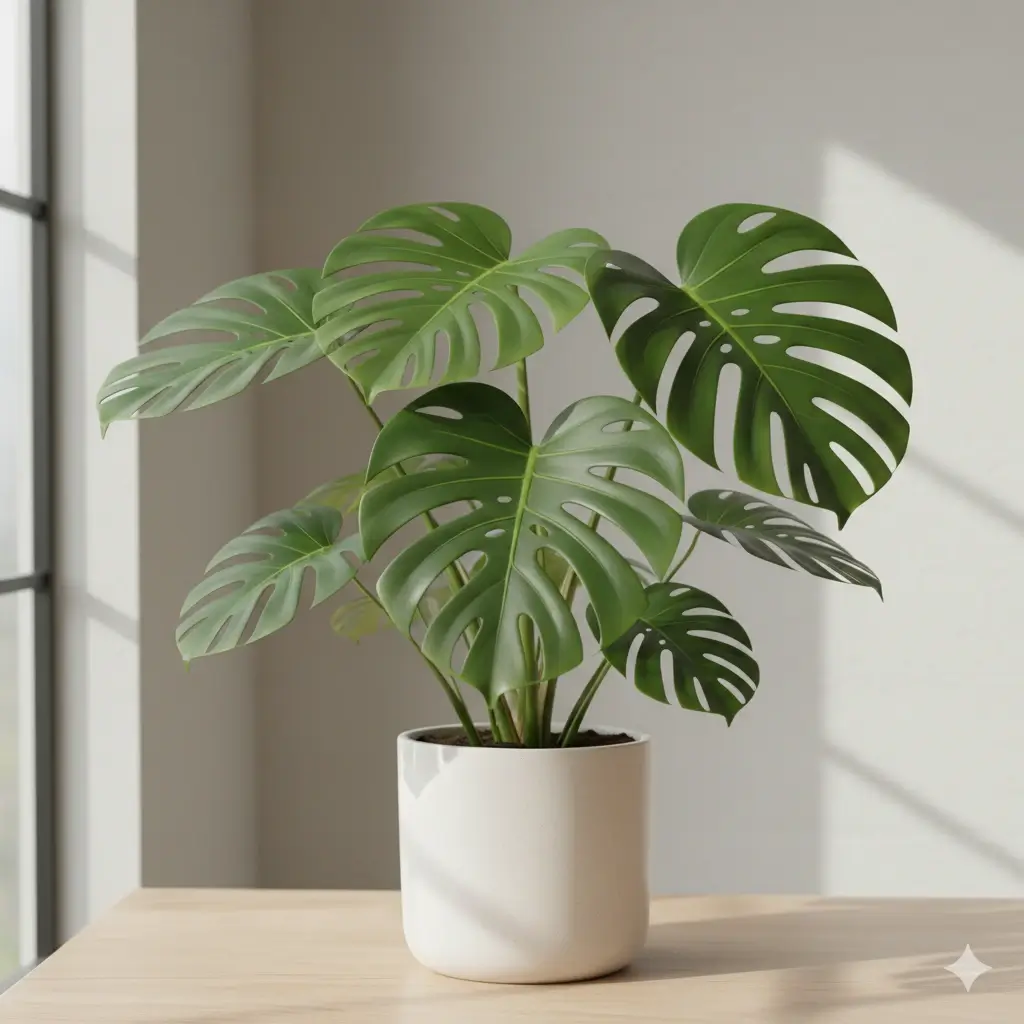
Monstera
Monstera deliciosa
A popular tropical houseplant often recognized from large green leaves with deep splits and inner fenestrations.
Possible Lookalikes: Rhaphidophora tetrasperma, juvenile Monstera plants, and some Philodendron varieties can look similar in a quick photo.
Next Step: For stronger confirmation, upload a close-up of one mature leaf together with a full view of the plant.
Possible Lookalikes:
Next Step:
What Free Means on This Plant Identifier Page
A free plant identifier should be clear about what you can do before you commit. This page lets you open the workflow, inspect a sample result, and prepare a photo without an app download. A live identification can require sign-in and credits, so check the current pricing details instead of assuming unlimited free results.
Free to open and preview
You can read the guide, upload a preview image, and see the result format without downloading an app or guessing what the output will contain.
No app install first
Use a phone or desktop browser to prepare a plant photo. This is useful when you only need a quick lookup and do not want another app on your device.
Live access is explained
The page separates the free preview from paid credit usage. Review the current access model before submitting a real photo so the result and cost are both clear.
How to Use a Free Plant Identifier
Choose a Clear Plant Photo
Use bright, even light and keep the leaf, flower, fruit, stem, bark, or whole plant large in the frame. A sharp subject gives the identifier more visible traits to compare.
Preview the Workflow
Check the sample result before you submit a live request. It shows how common and scientific names, family, care basics, safety context, and lookalikes can be organized.
Review Access Before Identifying
If you want a live match, sign in and confirm the current credit requirement. Treat the response as a likely identification, not an absolute safety or edible-plant verdict.
How to Get a Better Free Plant Identification
The quality of the photo often matters more than the phone or camera. Give the tool one strong clue first, then add a second view when similar plants remain.
Use Even Natural Light
Bright shade or soft daylight makes leaf edges, veins, petal shapes, and color patterns easier to read. Avoid heavy filters, glare, and deep shadows.
Fill the Frame
Keep the plant large enough for the tool to focus on the correct subject. A distant garden scene can hide the traits that separate close matches.
Show a Distinctive Part
A close leaf, flower center, fruit, stem, bark pattern, or node can be more useful than a generic whole-plant image. Choose the part that looks most characteristic.
Add a Second Angle
If the first result is uncertain, take a closer image instead of repeating the same view. A whole-plant photo plus a detail shot gives more useful context.
A free preview cannot fix a weak photo
You do not need a professional botany image. You do need a visible subject, steady focus, and enough detail to compare. If the result lists lookalikes, use that as a signal to photograph the feature that separates them.
What a Useful Plant Photo Can Show
A free plant identifier is most useful when the image contains evidence that a person can also check in real life.
Leaf Shape and Arrangement
Leaf outline, lobes, margins, veins, texture, and the way leaves attach to a stem can narrow a broad plant category.
Flowers, Fruit, or Seeds
Blooms, berries, cones, seed pods, and flower centers may provide clues that are missing from a plain green-leaf photo.
Growth Habit and Scale
A whole-plant view can show branching, climbing, rosette form, height, and the setting around a houseplant, weed, shrub, or tree.
Use the result as a shortlist
Similar species can share the same color or leaf outline. Compare the likely match with visible traits and use a second photo when the decision matters. Do not rely on one image result to decide whether an unknown plant is edible, medicinal, safe to touch, or safe for pets.
Free Plant Identifier vs Other Ways to Check a Plant
The right option depends on whether you need a quick preview, a live photo match, a browser workflow, or a broader research source.
| Option | Best for | Strength | Watch out |
|---|---|---|---|
| Free preview on this page | Seeing the workflow and result format before submitting | No app download; clear sample output and photo guidance | A live identification may require sign-in and credits |
| Live photo identification | Getting likely names from your own plant image | Combines visual clues with care and lookalike context | Image quality and similar species affect confidence |
| Plant identifier online | A browser-first lookup without installing an app | Easy to open on a phone, tablet, or desktop | Online access does not automatically mean unlimited free results |
| App or field guide | People who need saved history or deeper manual research | May add offline references, reminders, or field notes | Installation, subscriptions, or extra research time may be required |
If you only need to see how plant photo identification works, start with the free preview. If you need a live answer, check the current access and credit details first.
What You Can Learn From a Plant Photo Result
Common and Scientific Names
See a readable common name alongside scientific naming so you can continue researching the likely plant with better terms.
Family and Lookalikes
When the picture fits more than one species, related matches can help you compare the traits that matter instead of treating a guess as certain.
Care Starting Points
A likely match can be paired with simple light and watering context to help you decide what to check next.
Safety Context
The result can flag when pet or child safety deserves extra checking, while keeping the limits of photo-only identification clear.
Why the Match Fits
Trait-based notes make the result easier to review because you can compare leaf, flower, fruit, stem, or growth clues yourself.
Browser-Based Access
Open the workflow from a phone or desktop when you want to identify a plant without first installing another app.
Choose the Plant ID Page That Fits Your Question
The free plant identifier is the best starting point when cost and access matter. Use a more focused page when your intent is different.
Free Plant Identifier FAQs
Start With a Clear Plant Photo
Use the free preview to understand the workflow, then choose the access option that matches how often you need plant identification.